
TDU Cannot Connect to AGC – Guide
Problem
If your TDU cannot connect to the AGC, it is often due to an outdated software version.
Example below:
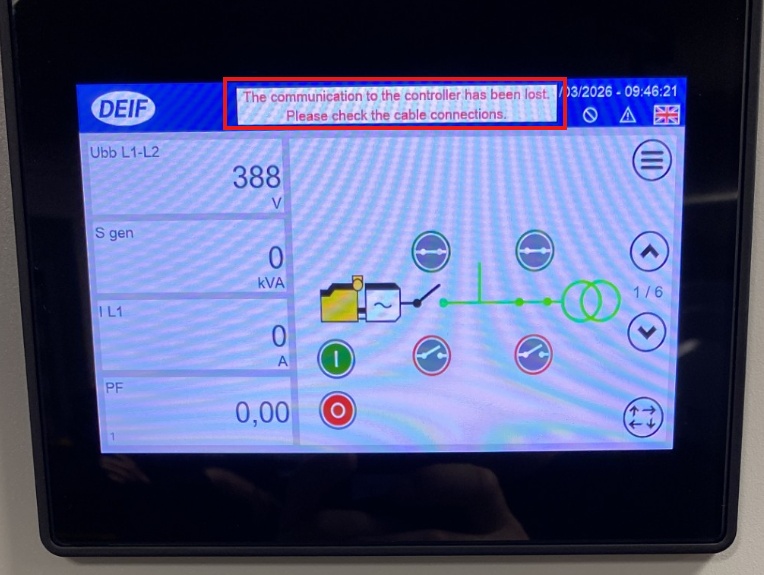
TDU units with software below version 1.4.3.0 may have communication issues with newer AGC units. Therefore, updating the software is recommended.
Check Software Version
Go to:
Home → Main Menu → Setup → About
Here you can find the firmware version.
Update via USB
Preparation
You will need:
- A USB drive (must be formatted as FAT32)
- A computer
- The latest software from DEIF
Download Software
- Go to: Software – Get the latest version for full functionality
- Select the software that matches your TDU model
- Follow the instructions in the DEIF email
- The file will be downloaded as a .zip file
Important: Do not unzip the file
Copy to USB
- Insert the USB drive into your computer
- Copy the .zip file directly to the USB drive
- Safely remove the USB drive
Install on TDU
- Insert the USB drive into the TDU
- The TDU will automatically detect the update
- Press Confirm
- Press Confirm again to restart
After Restart
- Select Startup sequence
- Press Install
- Navigate to:
- Mnt
- usbmemory
- Select the update file and press OK
During Installation
Wait until the Continue button appears
Finish
- Press Continue
- The TDU will restart
- Close the update window if it appears again
- Remove the USB drive
Result
The TDU is now updated and ready to use. The connection to the AGC should now work.