
An AGI may display a black screen if an unsupported BSP version has been installed on a newer unit.
In 2024, a new display was introduced for the AGI, which requires a minimum BSP version. Supported versions are 3.1.421 and 1.0.888 or later.
BSP versions in the 1.3.xxx range are not supported. Installing these versions will result in a black screen.
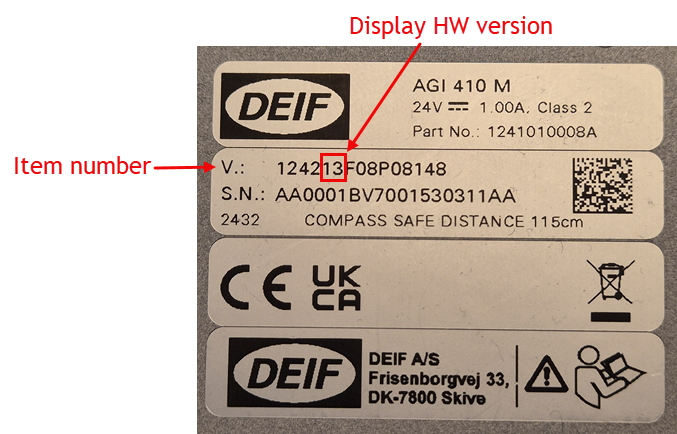
To determine whether your AGI is equipped with the new display, check the item number on the unit. This number is located on the silver label just above the serial number and consists of 15 characters.
Characters 5 and 6 indicate the display hardware (HW) version. AGIs with the new display introduced in 2024 have HW version 30 (e.g. 125130E13027148).
An example of the silver label location is shown below to help identify the item number.
Solution
If your AGI shows a black screen after a BSP update, it can be recovered by installing a supported BSP version using AGI Creator. For detailed instructions, please refer to this FAQ: https://deifsupport.deif.com/en/support/solutions/articles/80001145349-bsp-installation